Cleaning up HubSpot chaos: audit and data cleansing in 5 steps
Many HubSpot portals grow for years without any rules. We will show you how to conduct a HubSpot audit, clean up properties and duplicates, clearly define lifecycle stages, and ensure that the chaos doesn't return.

Matthias Deimann
Founder & Managing Director
12 Oct 2026
14 min read

You search for a customer in HubSpot and get three hits: "Müller GmbH", "Müller GmbH & Co. KG" and a contact without a company who actually belongs to them. Then there are 400 properties whose creators nobody remembers, and a dashboard that no one in sales trusts. You are not alone in this. Validity has analysed over 35 million CRM records from companies without data maintenance tools: 81% of them had to be corrected because they were duplicates, incomplete or invalid (Validity, 2024).
This article shows you how to clean up your HubSpot in five steps: with a short HubSpot audit, clear rules for properties and duplicates, clean lifecycle stages and a routine so that the chaos does not return. It is written for B2B companies with 10 to 100 employees who already use HubSpot and do not want to start from scratch. The examples are HubSpot-specific, but the procedure works just as well in any other CRM.
Key takeaways: An untidy HubSpot almost always has the same cause: a lack of rules. Proceed in this order: Backup, HubSpot audit, weed out properties, merge duplicates, define lifecycle stages and pipelines, clear out workflows. After that, a fixed routine with a responsible owner keeps the CRM clean. In a Validity evaluation (2024), 81% of CRM records without data maintenance had to be corrected.
How do you recognise that your HubSpot needs cleaning up?
Data and analytics leaders consider an average of 26% of their company's data to be untrustworthy (Salesforce State of Data and Analytics, 2025). In HubSpot, this rarely shows up as an error message, but rather by your team building workarounds around the CRM.
Typical warning signs:
The same company is in the CRM multiple times. With slightly different names, different spellings or without a domain.
Properties that only their creator understands. "Status_new", "Lead source 2", "Industry (old)".
Lifecycle stages without logic. Existing customers are still listed as "Lead", new contacts have no stage at all.
Deals without movement. The pipeline is full, but half of the deals have had no activity for months.
Reports that no one trusts. In meetings, someone opens the Excel spreadsheet again.
The HubSpot bill is rising. Unsubscribed and unreachable contacts continue to count as marketing contacts.

Source: Validity 2024, basis: CRM records from over 10,000 systems, the 81% relates to companies without data maintenance tools
The causes are almost the same everywhere. Contacts change jobs: between the ages of 35 and 49, employees in Germany had an average of nearly three employers, and less than 40% stayed with a single one during these 15 years (IAB, 2026). Every change makes an email address and a company association in your CRM worthless. Added to this are imports from trade fair lists, integrations that create their own records, and multiple admins building fields without common rules.
One source is often overlooked. HubSpot prevents duplicates during import by matching contacts via email address and companies via domain. However, according to HubSpot, companies created via API or a third-party integration are not deduplicated via domain (HubSpot Knowledge Base). If you have connected an ERP, a POS system or a form tool, you should look for duplicate companies there first.
Before you start: check backup, responsibility and subscription
Merged records cannot be separated again in HubSpot (HubSpot Knowledge Base). Deleted records can be restored for up to 90 days, but not records that were permanently deleted or deleted under GDPR (HubSpot Knowledge Base). Therefore, every clean-up project begins with three preparations:
Take a backup. Export contacts, companies and deals via the "All" view with all properties and associations (HubSpot Knowledge Base). The download links expire after 30 days, so save the files straight away.
Appoint a responsible person. One person decides which fields stay and which record wins when merging, otherwise every discussion ends with "better leave it in".
Freeze. During the clean-up, no one creates new properties, and imports only run through the responsible person.
Also check which tools your subscription includes, because not everything shown in HubSpot tutorials is available to you:
Tool | What for | Available from |
|---|---|---|
Data Quality (Data Quality Command Center) | Overview of duplicates, formatting errors and unused properties | Starter (Marketing, Sales, Service, Content or Data Hub) |
Manage duplicates | Check and merge duplicates for contacts and companies, up to 10,000 pairs | Professional or Enterprise (Marketing, Sales, Service, Data Hub or Smart CRM) |
Bulk duplicate management, custom duplicate rules | Merge many pairs at once based on fixed rules | Data Hub Professional or Enterprise |
Workflow health | Find faulty and unused workflows | Professional or Enterprise |
Automatic formatting | Correct spelling, spaces and formats by rule | Data Hub Professional or Enterprise |
Export and archive properties | See fill rate and usage per property, hide fields | all subscriptions |
Source: HubSpot Knowledge Base, accessed October 2026. Data Hub was previously called Operations Hub.
The 5 steps at a glance
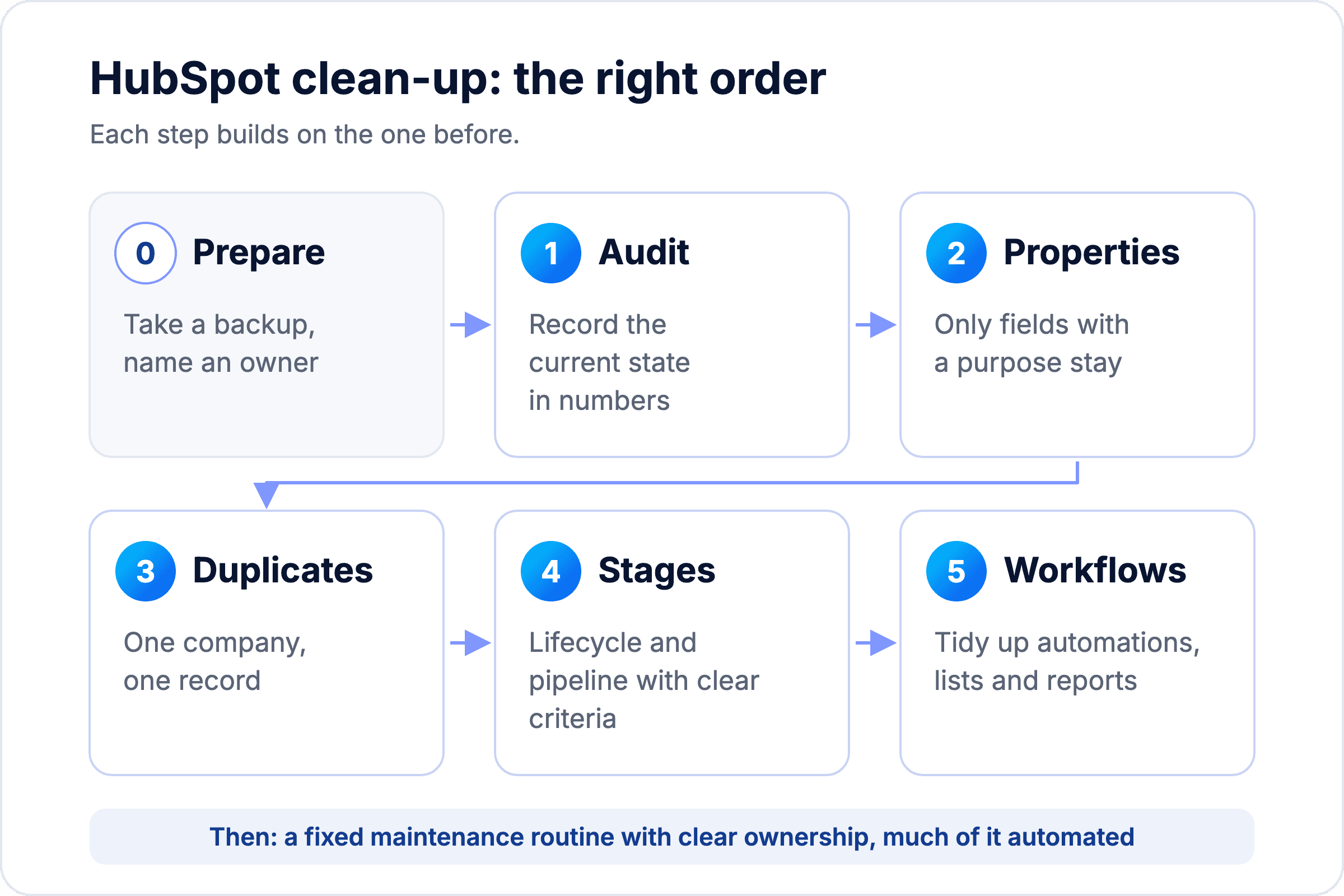
Cleaning up is not a task to be left to IT. According to Salesforce, 79% of top performers in sales give data hygiene high priority, compared to only 54% of underperforming sellers (Salesforce State of Sales, 2026). The graphic shows the order in which we proceed.
Graphic: Hubtimal
There is a reason for the order. Anyone who merges duplicates before it is clear which properties count has to decide on hundreds of fields for each pair. Anyone who redefines lifecycle stages while the same company exists three times gets incorrect figures. And anyone who adjusts workflows before the fields are fixed has to rebuild them a second time after cleaning up.
Step 1: Do a HubSpot audit
You only know what your portal really looks like when you count. In the Validity evaluation, only 31% of lead records had complete contact details such as phone, address and email (Validity, 2024). The HubSpot audit, sometimes also called HubSpot Health Check, provides you with a baseline in figures against which you can measure progress later.
The starting point is the overview under Data Management > Data Quality. There, HubSpot shows duplicates, formatting problems and properties without data (HubSpot Knowledge Base). You check the rest with saved filters. The thresholds in the table are rough guidelines, because what is "critical" depends heavily on the size of your CRM, your industry and your business model.
Checkpoint | How to find it in HubSpot | Critical from (guideline) |
|---|---|---|
Duplicate companies and contacts | Data Quality > Duplicates | from approx. 5% of the database |
Properties without data | Settings > Properties > Export with fill rate | when around a third of custom properties are filled below about 10% |
Contacts without lifecycle stage | Contact filter: Lifecycle stage is unknown | from about 10% |
Contacts without company | Contact filter: no associated company | from about 20% in B2B |
Deals without movement | Deal filter: last activity older than 30 days | from around a quarter of open deals |
Unused workflows | Automation > Workflows > "Health" tab | any workflow without enrolment for 90 days |
Contacts that can no longer be reached | Contacts with hard bounce or unsubscribed | any of them still set as a marketing contact |
Approximate guidelines from our work with B2B sales teams, not HubSpot requirements. Where your threshold lies depends heavily on the size of your CRM, your industry and your business model.
Write down the values with the date in a simple table. This audit does not need more than that, because it is meant to show you where the biggest chaos lies and not solve everything at once.
One question is still part of it, and it is not found in any tool: ask two people from sales which report they actually use. If the answer is "none", you know how much trust the CRM currently enjoys.
Step 2: Weed out properties
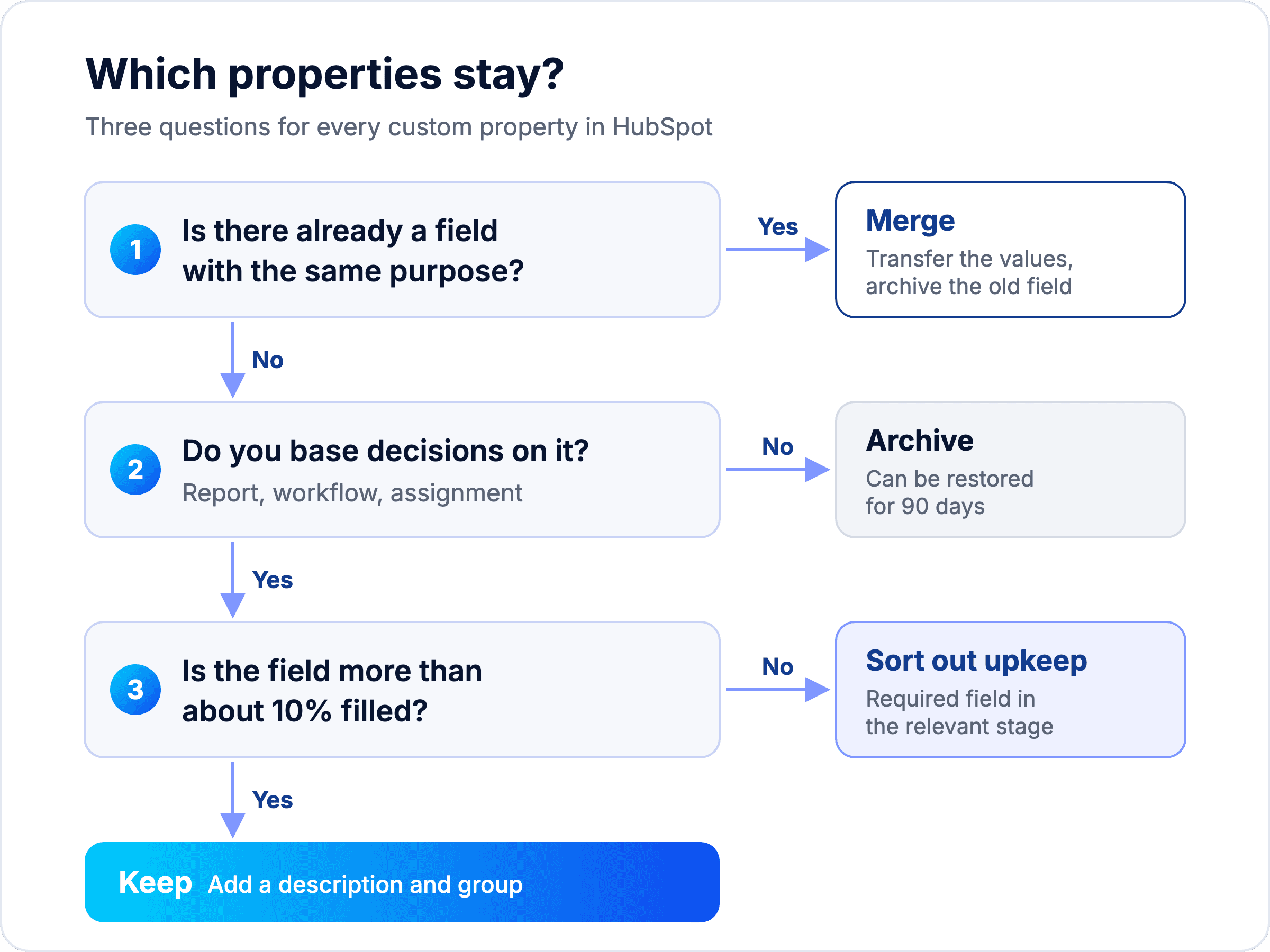
Cleaning up properties is relatively low-risk. Archived fields land in the "Archived" tab in HubSpot and are only permanently deleted after 90 days, before which you can restore them at any time (HubSpot Knowledge Base). So all you need to do is decide carefully which fields are really needed.
Here is how you proceed:
Export all properties. The export under Settings > Properties contains the fill rate and shows in which workflows, forms, lists and reports a field is used.
Check every custom field with one question: What decision do we make based on this field? The graphic below helps you with this.
Merge duplicate fields. "Branche", "Industry" and "Branche_neu" become one field; you transfer the values via workflow or via export and re-import.
Replace free text with select fields. A dropdown with eight industries can be evaluated, a free text field with 140 spellings cannot.
Describe every field. Use the description field for purpose and owner, and organise fields into a few clearly named groups.
Graphic: Hubtimal
Good to know: you cannot archive properties that are still active in a workflow or form. HubSpot shows you which assets are blocking when you try to archive. So clean up the usage first and then archive. Leave HubSpot standard properties as they are, and at most hide them in the views.
Step 3: Merge duplicates and clean up contacts
Duplicate and outdated contacts distort reports, end up in the wrong sequences and increase the bill for marketing contacts. How quickly contact data becomes unusable is shown by Validity: 13% of the analysed email addresses were invalid, and a further 34% could not be verified with certainty (Validity, 2024).
Finding and merging duplicates in HubSpot
HubSpot scans for potential duplicates daily. For contacts, it compares first name, last name, email, phone number, postcode and company name, among other things; for companies, it matches domain, name, country, phone and industry (HubSpot Knowledge Base). You can find the suggestions under Data Quality > Duplicates.
Fixed rules apply when merging (HubSpot Knowledge Base):
By default, the values of the primary record win. In the dialogue, you can select individual values; HubSpot fills empty fields with values from the secondary record.
For the lifecycle stage, the stage that is further advanced in the funnel remains.
The property history of both records is preserved, and the secondary email address becomes an additional address.
A merge cannot be undone.
This gives us our order: companies first, then contacts. If the companies are clean, contacts will be linked to the correct company after merging. Decide beforehand which record wins, for example the one with the most recent activity, and check the first 20 pairs manually before processing larger volumes.
Cleaning up contacts without losing data
Not every contact that no longer delivers value needs to be deleted. HubSpot only charges for marketing contacts in Marketing Hub, and contacts with a hard bounce, unsubscribe or no engagement can be classified as non-marketing contacts (HubSpot Knowledge Base). The history is preserved, but they no longer count towards the bill.
Pay attention to timing: the change takes effect on the next update date, and you only get a lower contact tier at contract renewal (HubSpot Knowledge Base). Cleaning up a few weeks before renewal therefore saves the most.
You should only delete what is truly worthless: test contacts, obvious spam and records without name and email. For everything else, "Non-marketing" is the safe choice.
Step 4: Redefine lifecycle stages and pipelines
A contact once mistakenly marked as an "Opportunity" remains there until someone clears the value. This is because HubSpot only moves the lifecycle stage forward, never backward, during automatic updates (HubSpot Knowledge Base). This is intentional, as the stage shows how far someone has progressed in the funnel. If a customer becomes an ex-customer, that is not a new stage but a lead status. You therefore need definitions that everyone on the team understands in the same way.
HubSpot comes with these default stages: Subscriber, Lead, Marketing Qualified Lead (MQL), Sales Qualified Lead (SQL), Opportunity, Customer, Evangelist and Other. Super Admins can rename, add or delete stages (HubSpot Knowledge Base). More important than the names are the entry criteria. How you define them and cleanly separate MQL and SQL is shown in detail in the article Setting up Lifecycle Stages correctly.
Stage | Entry criterion (Example B2B mid-sized business) | Who sets it |
|---|---|---|
Lead | Contact with company and consent or an existing business relationship, no qualifying signal yet | Form or import, automatic |
MQL | Matches target audience and shows interest, e.g. demo request or two visits to the pricing page | Workflow according to fixed rules |
SQL | Sales has spoken to the contact and confirmed need, budget range and contact person | Sales, manual |
Opportunity | A deal with an amount and a next step exists | automatic when creating the deal |
Customer | A deal is won | automatic when winning the deal |
A few settings make these definitions robust:
Set stages automatically from deals. HubSpot can set the stage when the first deal is created or a deal is won (HubSpot Knowledge Base).
Understand synchronisation. The option to sync only transfers the stage from the primary company to its contacts, never vice versa.
Required fields per deal stage. In the pipeline settings, you define which fields must be filled before a deal can move to the next stage, for example amount and decision-maker before "Proposal" (HubSpot Knowledge Base).
Correct real data errors on a one-off basis. Only during clean-up: clear the incorrectly set lifecycle stage via workflow for the affected list and set it again. This is a one-off correction; in ongoing operations, the stage only goes forward.
The difficulty here is less the technology and more the alignment. A pattern that often appears in portals that have grown organically: Marketing counts every form submission as an MQL, while Sales only counts contacts with a scheduled call. Both figures are correct in isolation but do not fit together, and existing automations depend on the old values. This step therefore usually takes the longest because it defines responsibilities between the teams.
Free scoping workshop
Rather not define lifecycle stages and pipelines on your own?
In the free scoping workshop, we spend 30 minutes looking at your HubSpot: setup, pipeline and the numbers you get out of it. You leave with a clear order of what you can clean up yourself and where help is worth it.
Book a free scoping workshop
30 minutes · free · no obligation
Step 5: Declutter workflows, lists and reports
A workflow that has been filling a field called "Lead source 2" for two years ruins every clean-up effort. According to Validity, 57% of companies clean up their CRM data manually (Validity, 2025), and a portion of this manual work is caused by automations that nobody understands anymore.
Check workflows. Under Automation > Workflows, in the "Health" tab, HubSpot shows workflows that need checking and workflows without enrolment for at least 90 days (HubSpot Knowledge Base). Turn off unused ones, and fix or disable faulty ones.
Introduce a naming convention. For example "Team | Purpose | Object", such as "Sales | Lead Assignment | Contacts". This way, everyone instantly sees who owns a workflow.
Clean up lists. Delete static import lists from trade fairs or old campaigns as soon as the contacts are cleanly assigned.
Reduce reports and dashboards. Give every dashboard an owner, and discard what has not been opened for three months.
Automate formatting. With Data Hub Professional, you can standardise spelling, spaces and capitalisation using a workflow action (HubSpot Knowledge Base).
How to keep your HubSpot clean
For a company with 30 people, a full-time position for data quality is not needed, and most are not planning one either. Only 18% of companies without a fixed role for this intend to create one within a year (Validity, 2025). What you need instead are clear responsibilities and a fixed rhythm.
A lot of this no longer runs manually today. According to its own statement, HubSpot detects potential duplicates with its Breeze AI and can send a weekly data quality report via email on request (HubSpot Knowledge Base). Automatic data enrichment fills in missing company and contact details (HubSpot Knowledge Base), and workflows create tasks as soon as required information is missing (HubSpot Knowledge Base). The table shows what should happen at what frequency and how to automate it.
Rhythm | Task | How it can be automated |
|---|---|---|
Weekly | Check new duplicates, follow up on deals without a next step | HubSpot suggests potential duplicates automatically on a daily basis. A workflow creates a task for the deal owner if required information is missing. |
Monthly | Check new properties and imports, view workflow health | The weekly data quality report arrives by email; workflow health shows faulty and unused workflows. |
Quarterly | Repeat the audit from step 1 and compare with the last quarter | Saved filters and a dashboard with the audit values. Automatic data enrichment fills in missing company and contact details. |
Availability according to HubSpot Knowledge Base: Data quality overview, weekly report and data enrichment from Starter; duplicate tool and workflow health from Professional; automatic formatting with Data Hub Professional or Enterprise.
Additionally, establish four ground rules once:
One owner for data. Not as a full-time job, but as a clear role with decision-making authority.
New properties by request only. With purpose, field type and owner. Anyone who cannot justify a field does not get one.
Imports only via a template. With fixed columns, required fields and the owner as reviewer.
Document integrations. Keep track of which app creates which records. This helps you find new duplicate sources before they cause damage.
Who is permanently responsible for this system is ultimately a question of Revenue Operations. You can read more about this in Revenue Operations explained.
Clean data is also the prerequisite for your team to trust the CRM at all. You can read how to increase adoption in our article on CRM Adoption.
Does this only apply to HubSpot?
No. 91% of companies in Germany with at least 20 employees use a CRM application (Bitkom, 2024), and data chaos arises in all of these systems. In Pipedrive, Salesforce or Close, the menus look different, but the steps remain the same: measure, weed out fields, merge duplicates, define stages, check automations, establish rules.
Sometimes, however, the audit shows that the system itself is no longer a fit, for instance if you are paying for features that no one uses, or if your sales team struggles with the interface. Whether cleaning up or changing systems is the better path is something we clarify in our vendor-neutral CRM Consulting. If you are staying with HubSpot and looking for support with setup and automations, you can find more under HubSpot Consulting.
Frequently asked questions about HubSpot audits and cleaning up
What does a HubSpot audit check?
A HubSpot audit, often also called a Health Check, measures the current state of your portal: duplicates, properties without data, contacts without a lifecycle stage or company, deals without activity, unused workflows and contacts with a hard bounce. According to HubSpot, the data quality overview for this is available from the Starter subscriptions. The seven checkpoints with thresholds can be found in step 1 above.
How long does it take to clean up HubSpot?
For a portal with a few thousand contacts, we estimate two to four weeks. The alignment of lifecycle stages and merging duplicates usually take the longest. After that, you maintain the standard with a fixed routine, much of which can be automated with workflows and notifications, along with a quick quarterly audit.
Can I merge duplicates in HubSpot automatically?
Partially. The "Manage duplicates" tool in the Professional and Enterprise subscriptions suggests up to 10,000 pairs, which you confirm individually. Bulk management and custom duplicate rules are available with Data Hub Professional or Enterprise. Because merges cannot be undone according to HubSpot, you should always check the first few pairs manually.
Should I delete old contacts or mark them as non-marketing contacts?
In most cases, mark them. Non-marketing contacts do not count towards billing in Marketing Hub, but their history is preserved. Deleting is only worthwhile for test data, spam and empty records. Deleted contacts can be restored for up to 90 days according to HubSpot, but GDPR deletions cannot.
Do I need Data Hub for the clean-up?
No. Exporting, archiving properties and the data quality overview are available from the Starter subscriptions, and the duplicates tool with up to 10,000 pairs from Professional. Data Hub (formerly Operations Hub) is only worthwhile if you want to process large volumes of duplicates at once or correct formats automatically via workflow.
Conclusion: Clean up first, then set rules
You cannot clean up a HubSpot account that has grown over years in an afternoon. With the correct sequence, however, it becomes a project of just a few weeks:
Secure and measure. Take a backup and record the current status in the HubSpot audit.
Fewer fields. Every property needs a purpose, otherwise it gets archived.
One company, one record. Merge companies first, then contacts, and check the first few pairs manually.
Clear stages. Lifecycle and deal stages with verifiable entry criteria agreed upon by Marketing and Sales.
Fixed routine. A responsible owner, fixed weekly, monthly and quarterly check-ins, and as much automation as possible.
Your next step
Want to know where your HubSpot stands right now?
Together we go through the audit checkpoints from this article in your portal and tell you honestly which step will make the biggest difference for you. The result is a roadmap you can start on straight away.
Book a free scoping workshop
30 minutes · free · no obligation
Blog
More articles
Matthias Deimann
Founder & Managing Director
17 min read
When is a lead an MQL, and when is it an SQL? Here is how you define lifecycle stages, lead status, and handovers so that marketing and sales speak the same language.
Matthias Deimann
Founder & Managing Director
14 min read
What RevOps means, how it differs from Sales Ops, and how you can get started with it in medium-sized businesses without a dedicated RevOps team.
Matthias Deimann
Founder & Managing Director
14 min read
Almost every company has a CRM, but hardly any team actually works in it. Here is how you can find the root cause and change that in 90 days.