Setting up Lifecycle Stages correctly: MQL, SQL, and the handover to Sales
Marketing counts MQLs, sales counts appointments, and nobody trusts the other's numbers. We will show you how to define lifecycle stages with verifiable criteria, cleanly separate MQLs and SQLs, regulate the handover via SLA, and build a reporting system on top that both teams accept.

Matthias Deimann
Founder & Managing Director
12 Oct 2026
17 min read

In many B2B companies, what constitutes a Lead, an MQL or an SQL is not defined at all. Marketing and Sales still count diligently, just each according to their own rules. This is not an isolated case: 49% of sales leaders say that their sales department defines a qualified lead significantly differently than marketing does (Gartner, 2025).
This article shows you how to set up Lifecycle Stages so that Marketing and Sales speak the same language. You will get a definition table for each stage, clear handover criteria between MQL and SQL, the difference between Lifecycle Stage and Lead Status, the appropriate automations, and the metrics you can reliably read afterwards. The examples come from HubSpot, but the principle applies to any lead management process and in any CRM. If your portal needs tidying up first, read our article Cleaning up HubSpot chaos first.
Key takeaways: Lifecycle Stages show where the relationship with a contact or company stands. For them to work, each stage needs a verifiable entry criterion and an owner. The most important rule: The Lifecycle Stage only goes forward, never back. An MQL is a lead that marketing considers ready according to fixed rules. An SQL is a lead whose need has been confirmed by sales in a conversation. What sales does in between and whether a lead has been rejected belongs in the lead status. A written SLA governs the handover.
What are Lifecycle Stages?
Lifecycle Stages describe which stage of the relationship a contact or company is in with your business: from the first subscription to the qualified lead to the customer. Each record has exactly one value. Almost all reports used jointly by Marketing and Sales depend on this.
Behind this is primarily coordination between two teams. According to Gartner, Marketing and Sales only work together on average in 3 out of 15 commercial activities, and 90% of executives from both areas say their priorities conflict (Gartner, 2024). Clean Lifecycle Stages create precisely this kind of shared task: They define when a contact moves from one team to the other.
"In many companies, this is not defined at all. Everyone talks about leads, but nobody knows what conversions they are actually optimising for, what a good lead is, and what the conversion rates between the stages to the customer look like. I have seen clients who had MQLs and SQLs in the tool, but no 'Customer' stage at all. Nobody on the team knew how an SQL was defined, even though that was the main metric. This really is the Wild West, and I am shocked by how few people think about it. Yet this is the easiest lever for more clarity: define it cleanly once and set it up, done. And then, of course, it has to be maintained as new forms or conversion points are added."
Matthias Deimann, Founder of Hubtimal
A viable lifecycle model meets three conditions:
Each stage has a verifiable entry criterion. "Shows interest" is not enough. "Has requested a demo" is.
Each stage has an owner. Up to the MQL, it is Marketing; from the SQL, it is Sales.
The stages describe the relationship, not the activity. "Initial conversation scheduled" is a workflow step, not a Lifecycle Stage.
Contact or Company: Where the stage belongs
In B2B, a single person rarely buys. According to Forrester, a typical purchasing decision now involves 13 internal stakeholders and 9 external influencers (Forrester, 2026). For your CRM, this means: From the Opportunity stage onwards, the company counts, not the individual contact. HubSpot can therefore sync the stage from the primary company to all associated contacts, but only in this direction (HubSpot Knowledge Base). This ensures that the purchasing manager at the same company is no longer listed as a "Lead" in the CRM while her Managing Director is already a "Customer".
MQL vs. SQL: What is the difference?
A Marketing Qualified Lead (MQL) is a contact that Marketing classifies as ready for handover to Sales based on fixed rules. A Sales Qualified Lead (SQL) is a contact that Sales has qualified as a potential customer (HubSpot Knowledge Base). We recommend always tying this qualification to a conversation that has actually taken place. The difference therefore lies in who decides and what this decision is based on: With the MQL it is data, with the SQL it is a conversation.
Buyers make this separation even more important. 67% of B2B buyers would prefer to buy without a salesperson at all (Gartner, 2026). They research alone for a long time and get in touch late. At the same time, 73% of buyers actively avoid vendors who contact them with inappropriate messaging (Gartner, 2025). So, calling everyone who downloads a whitepaper immediately burns contacts. An MQL therefore needs two things simultaneously:
Fit: The contact belongs to your target group, for example by industry, company size, role, and region.
Intent: The contact shows a signal indicating a concrete need, such as a demo or quote request, a call-back request, or multiple visits to the pricing page.
A newsletter subscription or a single download is a signal of interest in the topic, not in buying. Such contacts remain a Subscriber or Lead until a stronger signal arrives.
Do you need lead scoring with points for this? Usually not. For the MQL, we recommend a clear if-then rule: Fit criteria met and at least one strong signal, then MQL. Anyone on the team can understand such a rule. In our experience, scoring is only worthwhile with a really large lead volume, and even then, simple grading is often enough: You classify leads as A, B, or C based on their fit, instead of assigning points for every behaviour.
In many models, the Sales Accepted Lead (SAL) also appears between MQL and SQL: Sales has accepted the lead but has not spoken to them yet. The idea is sound, but it does not need its own Lifecycle Stage. It is better placed in the Lead Status.
All Lifecycle Stages at a glance: Definitions for B2B
HubSpot comes with eight default stages: Subscriber, Lead, MQL, SQL, Opportunity, Customer, Evangelist, and Other. Automatic updates only move a record forward (HubSpot Knowledge Base). Make this your most important rule: A Lifecycle Stage only goes forward, never back. Stages like "Ex-Customer" or "Churn" therefore do not belong in the Lifecycle Stage, but in the Lead Status or in a custom property. The table shows how you can define each stage for a B2B company with 10 to 100 employees.
Stage | What it means | Entry Criterion (Example) | Owner |
|---|---|---|---|
Subscriber | Wants to read content, does not show buying interest yet | Newsletter or blog subscription | Marketing |
Lead | Known contact with business relevance | Form with company details, download, trade fair contact | Marketing |
MQL | Ready for a conversation from a Marketing perspective | Fit criteria met and a strong buying signal | Marketing sets, Sales reviews |
SQL | Sales confirms genuine need | Conversation conducted; need, timeframe, and contact person clarified | Sales |
Opportunity | Concrete deal in progress | Deal created with amount and next step | Sales |
Customer | Paying customer | First deal won | Customer Success / Account Management |
Evangelist | Customer who actively recommends you | Reference, recommendation, or review submitted | Customer Success / Account Management |
Other | Does not belong in the sales process | Partner, supplier, applicant, set manually with a reason | CRM Owner |
The entry criteria are examples. Define your own together and write them down.

Graphic: Hubtimal
How many stages you need does not depend on the size of the company, but on your sales process. In HubSpot, Super Admins can rename, add, reorder, and delete stages in all subscriptions (HubSpot Knowledge Base). This freedom tempts people to build a new stage for every single workflow step. Resist this: the fewer stages, the better. In our experience, the six in the graphic are sufficient for both small and large companies, as long as they fit their own process. Evangelist and Other are only added as needed.
Lifecycle Stage or Lead Status: What goes where?
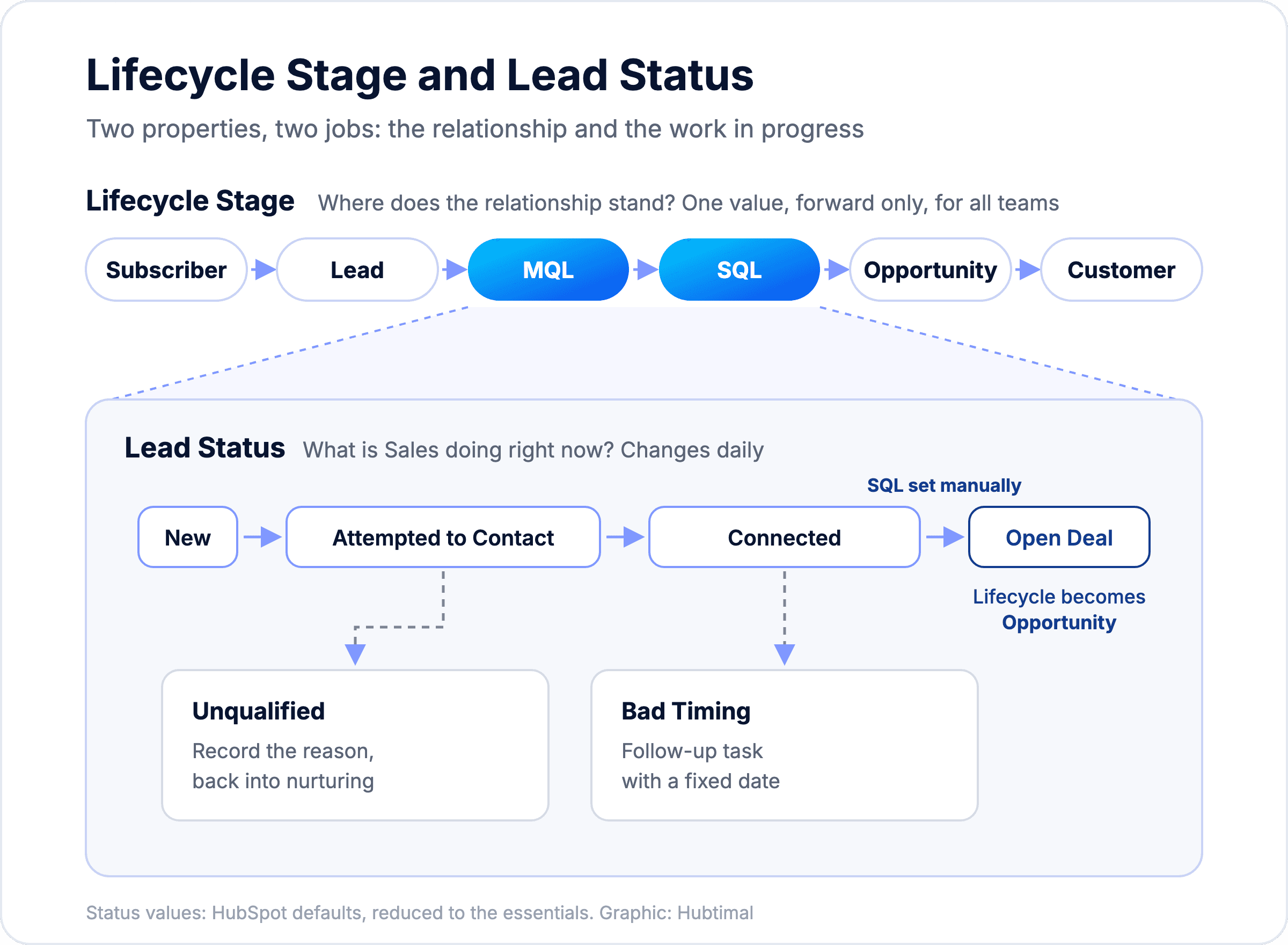
The Lifecycle Stage answers the question of where the relationship stands. The Lead Status answers the question of what Sales is currently doing with the lead. HubSpot describes the Lead Status as sub-stages within the Sales Qualified Lead and provides these default values: New, Open, In Progress, Open Deal, Unqualified, Attempted to Contact, Connected, and Bad Timing (HubSpot Knowledge Base).
Those who mix up Lifecycle Stage and Lead Status will soon find stages like "Initial Call" or "Quote Sent" in the Lifecycle Stage, and funnel reports will become unreadable. The Deal Stage comes in as a third level. In HubSpot, all three are distinct properties, and each has its own task:
Property | Answers the question | Who maintains it | How often does it change |
|---|---|---|---|
Lifecycle Stage | Where does the relationship stand? | Automatically, Sales sets SQL | Rarely, only forward, never back |
Lead Status | What is Sales doing right now? | Sales | Daily |
Deal Stage | How far along is a concrete deal? | Sales | Per deal, until won or lost |
Graphic: Hubtimal
We recommend streamlining the Lead Status and only keeping values from which an action follows. Of the HubSpot default values, six are usually enough: New, Attempted to Contact, Connected, Open Deal, Unqualified, and Bad Timing. "Open" and "In Progress" say too little about what happens next. Unlike in the HubSpot description, we recommend using the Lead Status starting from the MQL, because Sales is already working on the lead before the conversation. With "Attempted to Contact", you also map the Sales Accepted Lead at the same time.
With Sales Hub, there is also a dedicated Leads object with a Lead Pipeline. In Sales Hub Professional and Enterprise, HubSpot can automatically create a lead there when a contact reaches a certain Lifecycle Stage, and create a follow-up lead for later after a disqualification (HubSpot Knowledge Base). The principle remains the same: the Lifecycle Stage shows the relationship, the Lead Pipeline shows the work.
The Handover: When is a lead ready for Sales?
A lead is ready for Sales when they meet the fit criteria, show a strong buying signal, and the mandatory details are complete. The handover is also the point of greatest friction, because it is where two teams with different goals meet. In the Gartner survey, 60% of Marketing and Sales leaders say they lack shared insights into the buyer journey (Gartner, 2024). A good handover therefore answers three questions: When is a lead ready? What information does Sales get? And what happens if Sales rejects it?
Defining Handover Criteria
Write down the criteria so that someone without prior knowledge can check them:
Fit criteria as a list. For example, industry from a fixed selection, at least 10 employees, role of Managing Director, Sales or Marketing, based in Germany, Austria or Switzerland.
Separate strong and weak signals. Strong: Demo or quote request, call-back request, reply to a sales email. Weak: Download, webinar registration, newsletter click.
Mandatory details at handover. Company, role, a contact method, the source, and the context, i.e. why the contact is reaching out right now.
Note exceptions. A direct demo request from a matching company immediately becomes an MQL. Enquiries from existing customers go to Customer Success/Account Management and not into the new customer process.
An SLA between Marketing and Sales
A Service Level Agreement (SLA) is a written agreement about what both teams promise each other. It does not need to be a legal document; one page is enough. Both sides commit to something:
Marketing promises: an agreed number of MQLs per month according to the shared definition, each with source and context.
Sales promises: an initial contact within a fixed timeframe and a decision on whether the lead is accepted or rejected with a reason.
Both promise: a monthly meeting to review rejection reasons and adjust the definition.
As a rough guide from our work: initial contact ideally within about one business day, decision on acceptance or rejection within about one week. You define the exact timeframes yourselves, to suit your sales cycle. However, agree on them firmly and together, otherwise the SLA cannot be measured.
What happens to rejected leads?
Not every MQL becomes an SQL, and that is fine. However, rejected leads should not just be left lying around. Set the Lead Status to "Unqualified" and log a rejection reason from a fixed list, for example "not a fit for target group", "no budget", "wrong contact person", or "unreachable". After that, you add the contact to a nurturing list.
The Lifecycle Stage stays where it is. The contact was an MQL, and that is how they should remain in the reporting. Whether they are currently being worked on, rejected, or will be approached again later is shown solely by the Lead Status. For "Bad Timing", a follow-up task with a fixed date is sufficient. If the contact shows a new strong signal later, you set the Lead Status back to "New" and Sales takes over again.
The definition is thus more than a CRM setting. Marketing and Sales must agree on criteria, timeframes, and rejection reasons. This is easier if facilitated by someone who does not belong to either team.
Free scoping workshop
Define MQL and SQL together, without a never-ending debate?
In 30 minutes we look at your lifecycle stages, your handover and the numbers behind them. You get a clear recommendation on which definitions and rules to set first, so that marketing and sales mean the same thing when they say lead.
Book a free scoping workshop
30 minutes · free · no obligation
Automating Lifecycle Stages in HubSpot
With the exception of the SQL, almost every stage change can be automated. A human should set the SQL because it is based on a conversation. The settings for standard stage, deals, and synchronisation are available in all HubSpot subscriptions (HubSpot Knowledge Base); for workflows, you need a Professional subscription.
Here is how to set up the automation step by step:
Default stage for new records. In the pipeline rules of the Lifecycle Stage, you define which stage new contacts and companies start with, usually Lead. A pure newsletter form sets Subscriber instead.
MQL via workflow. The workflow starts when fit criteria and a strong signal come together. It sets the Lifecycle Stage to MQL and the Lead Status to "New", assigns an owner, and creates a task with a due date according to the SLA. The workflow action for setting a property is available from Professional onwards (HubSpot Knowledge Base). In the Starter subscription, you set the stage via forms or manually.
SQL by hand. Sales sets the SQL after the conversation. Make need, timeframe, and contact person mandatory fields before a deal can be created.
Opportunity and Customer from Deals. HubSpot can set the stage of associated contacts and companies when the first deal is created or a deal is won (HubSpot Knowledge Base).
Keep company and contacts in sync. Enable synchronisation from the primary company to contacts so that all contact persons of a customer are considered Customers.
Nurturing via workflow. If the Lead Status changes to "Unqualified", a workflow adds the contact to a nurturing list. In the case of "Bad Timing", it creates a task for follow-up. The workflow does not touch the Lifecycle Stage.
Monitor SLA. A segment (formerly an active list) shows all MQLs with Lead Status "New" that have been sitting longer than your agreed timeframe. For such cases, HubSpot recommends the combination of "Lifecycle stage is any of" and "Lifecycle stage not updated in the last x days" (HubSpot Knowledge Base).
Categorise new conversion points. The definition grows over time. Every new form and every new conversion point – whether demo request, download, webinar, or chat – gets a deliberate assignment before going live: Which stage does it set, and does it count as a strong signal for the MQL? This quick check is done by the person responsible for the definitions.
None of these settings will revert a stage. A customer does not become an Opportunity again just because someone creates a new deal.
Typical Mistakes with Lifecycle Stages
Most problems only appear in daily operations after setup. We encounter these eight mistakes time and again in projects:
Every form submission creates an MQL. Then, after two weeks, Sales has no desire to call MQLs, and the handover is devalued. We describe how quickly this can destroy trust in the CRM in the article CRM Adoption.
The Lifecycle Stage becomes the sales status. Stages like "Meeting Scheduled" or "Quote" belong in the Lead Status or the Deal Stage.
Stages are moved backwards. Rejected leads land back at Lead, ex-customers get their own stage "Churn". While HubSpot allows this manually (HubSpot Knowledge Base), doing so falsifies every conversion rate. Rejection and cancellation belong with a reason in the Lead Status or in a custom property.
Stages are skipped without a rule. If a contact jumps directly from Lead to Customer, the entry dates for MQL and SQL are missing. In HubSpot's funnel report, the "All" option only counts records that have passed through all selected stages (HubSpot Knowledge Base). Define when skipping is allowed and analyse these cases separately.
The Customer stage is missing. MQL and SQL exist in the CRM, but a stage for paying customers does not. Then every conversion rate ends at the SQL, and nobody sees how many leads make it to becoming a customer.
Contact and Company contradict each other. The contact is listed as a Customer in the CRM, while the company is still a Lead. The deal setting from step 4 sets contacts and company together to Customer upon a won deal, and the sync from step 5 then pulls all contacts of the company along.
Definitions change silently. Anyone who adjusts the MQL rule without recording the date can no longer compare before and after. Keep a quick changelog.
The main metric has no definition. The SQL stands as the most important number in the dashboard, but nobody on the team can say when a contact becomes an SQL. One person must own, write down, and approve changes to the definitions. Otherwise, each team builds its own logic.
Reporting: Which metrics Lifecycle Stages provide
Only clean Lifecycle Stages make funnel metrics reliable. Forrester estimates that less than 1% of leads turn into a closed deal, and therefore advises not just counting leads (Forrester, 2023). It is more meaningful to see where contacts get stuck in the funnel and why. For this reason, HubSpot stores the entry date for each stage, and from Professional onwards, also the time spent in the stage (HubSpot Knowledge Base).
Metric | Which question it answers | Where in HubSpot |
|---|---|---|
New records per stage and month | How full is the funnel? | Date of entry into the stage |
Conversion rate MQL to SQL | Is the MQL definition correct? | Funnel report |
Rejection rate and reasons | What is wrong with the definition? | Lead Status and rejection reason |
Time to initial contact | Is Sales adhering to the SLA? | MQL entry date and first activity |
Time spent in each stage | Where is it stalling? | Time in stage (from Professional) |
Conversion rate Opportunity to Customer | How well does Sales close deals? | Funnel report |
Two tips make these numbers much more meaningful:
Calculate in cohorts. An SQL in October often originates from an MQL in September. If you simply compare monthly totals, you distort the rate. Better: Take all MQLs from one month and see how many of them became SQLs later.
Compare yourself to yourself. There are no reliable industry benchmarks with disclosed methodology for MQL-to-SQL rates. The rate depends primarily on how strictly you define the MQL. Measure it over several months and observe the trend.
You can create custom funnel reports based on Lifecycle Stages in HubSpot starting with Professional subscriptions (HubSpot Knowledge Base). If you want to connect Marketing, Sales, and Reporting into a continuous system, you can find more under Revenue Operations. We show how Lifecycle Stages fit into a Revenue Operations model in the article Revenue Operations Explained.
Does this also apply outside of HubSpot?
Yes. Lifecycle Stages exist in every CRM, just under different names. In Salesforce, the Lead object with its Lead Status and the subsequent conversion into Contact, Account, and Opportunity take on this role. In Pipedrive or Close, there are dedicated areas for leads, which later become a deal or an opportunity. The terms differ, but the questions remain the same: When is a contact ready? Who decides? What happens in the event of a rejection? And which stages do we analyse?
The definition process often also reveals whether the CRM is a fit at all. If your system cannot map the handover cleanly or your team struggles with the interface, we clarify this in our vendor-independent CRM Consulting. If you are staying with HubSpot and looking for support with lifecycle logic and workflows, you can find more under HubSpot Consulting.
Frequently Asked Questions about Lifecycle Stages, MQL, and SQL
What is the difference between MQL and SQL?
An MQL (Marketing Qualified Lead) is a contact that Marketing considers ready according to fixed rules: they fit the target group and show a buying signal, such as a demo request. An SQL (Sales Qualified Lead) is a contact whose need has been confirmed by Sales in a conversation. With the MQL, data decides; with the SQL, the conversation does.
How many Lifecycle Stages does a B2B company need?
As few as possible, regardless of company size. Usually six are enough: Subscriber, Lead, MQL, SQL, Opportunity, and Customer. What matters is that the stages fit your process. You only need Evangelist and Other if required. Process steps like initial conversation or quote belong in the Lead Status or the Deal Stage.
What is the difference between Lifecycle Stage and Lead Status in HubSpot?
The Lifecycle Stage shows where the relationship with a contact stands, and only goes forward. The Lead Status shows what Sales is currently doing with the lead, for example "Attempted to Contact" or "Unqualified". HubSpot describes the Lead Status as sub-stages of the Sales Qualified Lead. We recommend using it starting from the MQL.
Can a contact in HubSpot go back to an earlier Lifecycle Stage?
Technically yes, you can select an earlier stage manually. Even so, don't do it. The Lifecycle Stage should only move forward, otherwise the funnel and conversion rates will no longer be accurate, and HubSpot clears older date fields in the process. You map rejected leads or ex-customers via the Lead Status. The only exception: correcting genuine data errors once.
Who is responsible for the Lifecycle Stages, Marketing or Sales?
Both, but for different stages. Up to the MQL, Marketing is responsible for the stages; from the SQL, Sales is; from Customer onwards, Customer Success/Account Management is. One person should be responsible for the definitions themselves. They approve changes and record them with a date so that reports remain comparable.
Conclusion: Language first, automation second
Lifecycle Stages are quickly set up and difficult to align. With this sequence, both succeed:
Define. Each stage gets a verifiable entry criterion and an owner, documented in writing.
Separate MQL and SQL. The MQL is based on fit and buying signal, the SQL on a conversation.
Only forward. The Lifecycle Stage never goes back. The work of Sales and rejected leads belong in the Lead Status.
Govern the handover with an SLA. With timeframes, rejection reasons, and a monthly review.
Automate and measure. Workflows for MQL, nurturing, and SLA; reporting in cohorts instead of monthly totals.
Your next step
Want to know where your handover is getting stuck?
Bring your funnel, whether it runs in HubSpot or another CRM. Together we look at how many MQLs reach sales, what happens to them there and which lever makes the biggest difference.
Book a free scoping workshop
30 minutes · free · no obligation
Blog
More articles
Matthias Deimann
Founder & Managing Director
14 min read
Duplicate companies, properties with no data, lifecycle stages with no logic: here is how you can tidy up HubSpot in five steps.
Matthias Deimann
Founder & Managing Director
14 min read
What RevOps means, how it differs from Sales Ops, and how you can get started with it in medium-sized businesses without a dedicated RevOps team.
Matthias Deimann
Founder & Managing Director
14 min read
Almost every company has a CRM, but hardly any team actually works in it. Here is how you can find the root cause and change that in 90 days.